What TradePilot Pro does today
Every item on this page was checked against the software before it was written. Things that are not built yet are listed at the bottom rather than hidden.
Estimating and customer approval
Build the quote from a price book, send a link, and get it approved and signed online. The estimate then becomes the project without re-entry.
- Price book. Labour, material, equipment, subcontract and fee items with cost, price, default markup and taxable flag. A starter catalogue is loaded for your trade when you sign up.
- Sections, markup, discount, deposit. Group lines by phase, set markup per line, apply a discount, and ask for a deposit as a percentage or an amount.
- Optional lines. Mark lines as optional. The customer ticks the ones they want on the approval page and the total updates.
- Templates and revisions. Save any estimate as a template. Revisions are numbered (R2, R3) and the approved one is locked.
- Send and track. Email the customer a link with a PDF. The status panel shows sent, viewed, approved, declined or expired.
- Approval with signature. The customer types their name and draws a signature. Name, time, IP address and the signature image are kept with the estimate.
- Change orders. Price a scope change on the project, send it, and the customer signs it the same way. It can be invoiced on its own.
- Leads. New, contacted, qualified, quoted, won and lost, with source, value, assigned person, next follow-up and a lost reason. Winning an estimate marks the lead won.
- Customers and properties. Residential and commercial customers with several job sites each, notes, service history and a communication log.
Invoicing, payments and taxes
Deposit, progress, final and recurring invoices from the same job, with Canadian sales tax preloaded for your province and exports your accountant can import.
- Invoice kinds. Standard, deposit, progress (by percentage or milestone), final and recurring. Create them from an estimate, a change order or a project.
- Payments. Record cash, cheque, e-transfer, card, financing or other payments against an invoice, in full or in part. Instalment plans can be set per invoice.
- Reminders and ageing. Send a reminder by hand or let the schedule do it (before due, then 1, 7, 14 and 30 days after). Overdue status is set automatically and the AR ageing report shows who owes what.
- Sales tax by province. GST, HST, PST and QST rates are loaded for your province when the company is created and can be edited. Lines can be marked non-taxable.
- Customer invoice page. Each invoice has a link the customer can open to view, download and see payments recorded.
- Accounting exports. Invoices, payments, customers and supplier bills export as CSV for QuickBooks Online and Xero, and as IIF for QuickBooks Desktop, with account-name mapping.
- Recurring billing. Weekly to yearly schedules that generate the invoice automatically, with optional auto-send.
Scheduling, dispatch and the field app
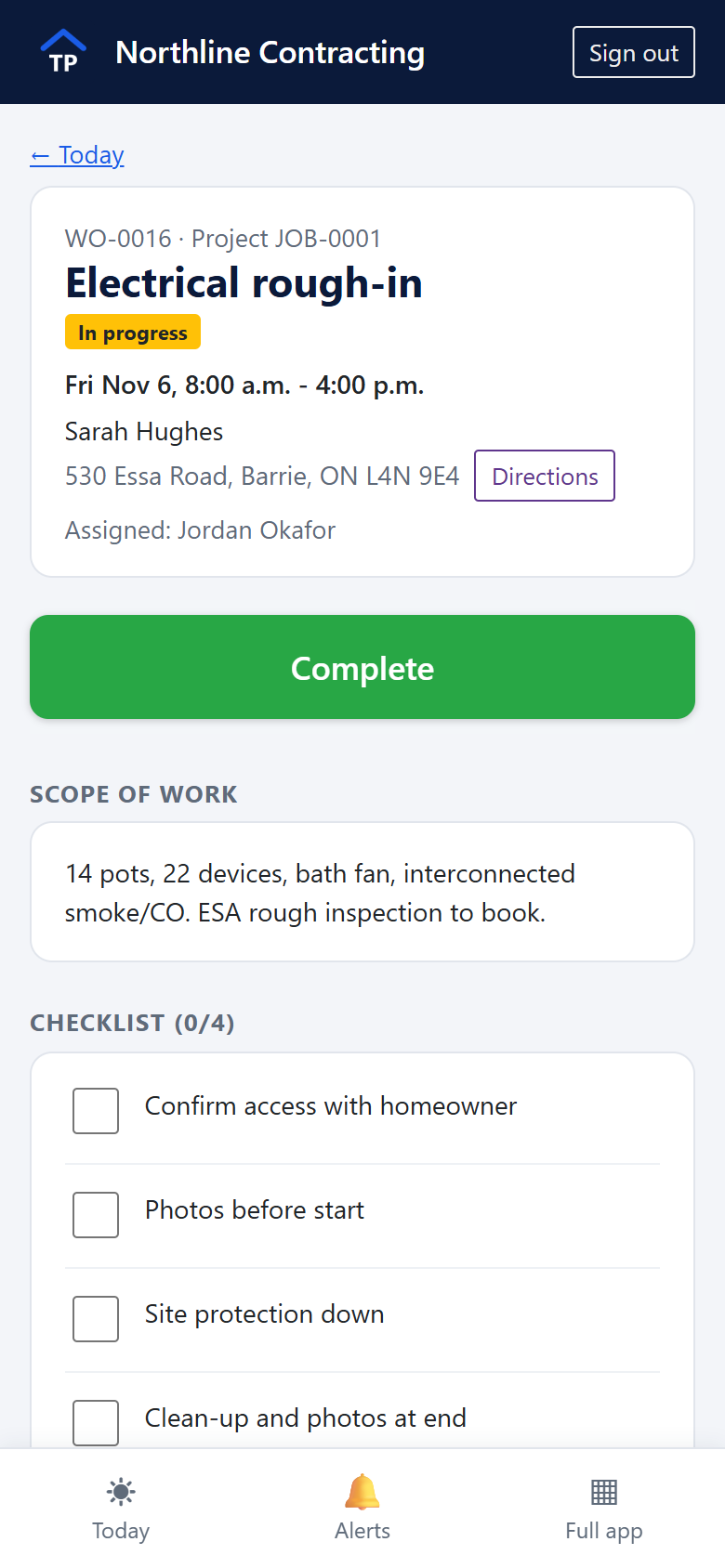
Work orders go on a board by day. Techs see their own jobs on their phones, with the checklist, photos, the time clock and a signature pad for the customer.
- Dispatch board. Columns per day for the range you choose, an unscheduled list, crew availability per day, and drag-and-drop onto a day. Assign a technician or a subcontractor.
- Schedule. Day, work-week, week and month calendar for appointments, site visits and reminders.
- Work orders. Checklist with who ticked what and when, photos and files, crew notes, completion notes, priority, weather-sensitive and warranty flags.
- Field app. A phone-sized view at /field: today's work orders, clock in and out, checklist, camera capture and customer sign-off. Add it to the home screen from the browser.
- Time clock. Clock in and out against a project or work order with break minutes. Location is recorded if the phone allows it, and can be required per employee.
- Timesheets and payroll. Weekly timesheets submitted by the tech and approved by the office. Overtime above a weekly threshold you set. Payroll summary exports to CSV.
- Notifications. Techs get an in-app notification when a job is dispatched to them. Customers get an email the day before a visit.
- Subcontractor portal. Invite a subcontractor to see the work orders assigned to them and submit their invoice against each one.
Projects and job costing
Every approved estimate becomes a project with a contract value, a budget and a running comparison of what you expected against what it is costing.
- Budget versus actual. Contract value, budgeted cost and hours from the estimate, actual labour from the time clock and actual costs from expenses, compared per project and across all jobs.
- Expenses. Material, subcontractor, equipment, permit, fuel and disposal costs with a receipt attached and the supplier or sub recorded.
- Daily logs. Weather, crew on site, hours, deliveries, issues, inspections and safety notes, with photos.
- Permits and inspections. Track permits and inspection dates against the project.
- Sign-off and completion report. Customer signs off on completion; a branded completion report is generated. A satisfaction survey can be sent afterwards.
- Warranty and service requests. Warranty period per project. Customers raise service requests in the portal; the office turns them into work orders.
- Safety. Incidents by severity, safety inspections and toolbox-talk checklists under one safety hub.
Blueprints and takeoffs
Upload the drawing, set the scale and measure on screen. Measurements become a material list with waste applied, priced from your suppliers.
- Plan files. PDF (one sheet per page), PNG and JPG images, and DXF or DWG drawings.
- Calibrate and measure. Set the scale per sheet, then measure distance, area, perimeter, volume and counts, plus wall, room and roof tools with pitch factor and openings deducted.
- Layers and annotations. Measurements grouped by trade or layer with colours; text, arrows, clouds and highlights for markups; export an annotated PDF.
- Revisions. Load the revised sheet against the old one and compare them as an overlay.
- To material list. Send takeoff quantities to a material list with waste percentages from the trade calculators, then price it across suppliers.
- Trade calculators and floor plans. Calculators for drywall, paint, roofing, framing, concrete, flooring, insulation and decking; a simple 2D floor-plan drawing tool that feeds the takeoff.
- Site measure. Enter measurements on site from a phone with a photo and location attached.
Suppliers and purchasing
Keep each supplier's price list in the system, see who is cheapest for a material, and turn a material list into purchase orders split across suppliers.
- Supplier price lists. Import a supplier's price sheet from a CSV file with pack sizes and your contractor price. Every item shows when it was last updated, and price history is kept.
- Compare. Search a material and see each supplier's price, cheapest first. Equivalent products from different suppliers can be linked so they compare as one.
- Purchase orders. Build a PO from a material list, split the list across suppliers by lowest price, send it as a PDF, and receive it in full or in part.
- Supplier bills and inventory. Record supplier bills against POs, and track stock with transactions and reorder levels.
- Preferred suppliers. Pin a preferred supplier on a catalogue item when terms or delivery matter more than price.
Prices come from files you import. There is no live connection to supplier systems, and TradePilot Pro does not fetch prices from retailer websites.
Team, roles and permissions
Everyone signs in with their own account and sees what their role allows. Certifications, equipment and subcontractor paperwork have expiry reminders.
- Roles. Owner, admin, office, technician, subcontractor and customer. Eighteen permissions (view costs, record payments, approve time, dispatch, export payroll, manage settings and more) with sensible defaults you can change per role.
- Approval rules. Require a second approval above a dollar threshold or discount percentage on estimates, purchase orders, change orders, expenses, invoices and time off.
- Employee profiles. Trade, cost and bill rates, hire date, availability, emergency contact and payroll ID.
- Certifications and equipment. Certifications with expiry dates and reminders; tools and equipment with assignment history and service dates.
- Subcontractors. Records with WCB and insurance expiry alerts, work order assignment and a portal login.
- Several companies, one login. One sign-in can belong to more than one company and switch between them.
Reports, audit log and portal
The numbers an owner asks for, a record of who changed what, and a portal where customers help themselves.
- Reports. Revenue versus expenses by month, job profitability, estimate versus actual, sales pipeline, productivity and AR ageing. Grids export to CSV.
- Report builder. Pick a dataset (invoices, estimates, projects, time entries, expenses), choose columns, filters and grouping, save it and export it.
- Audit log. Every change to every record is kept with the field-level differences, who made it and when.
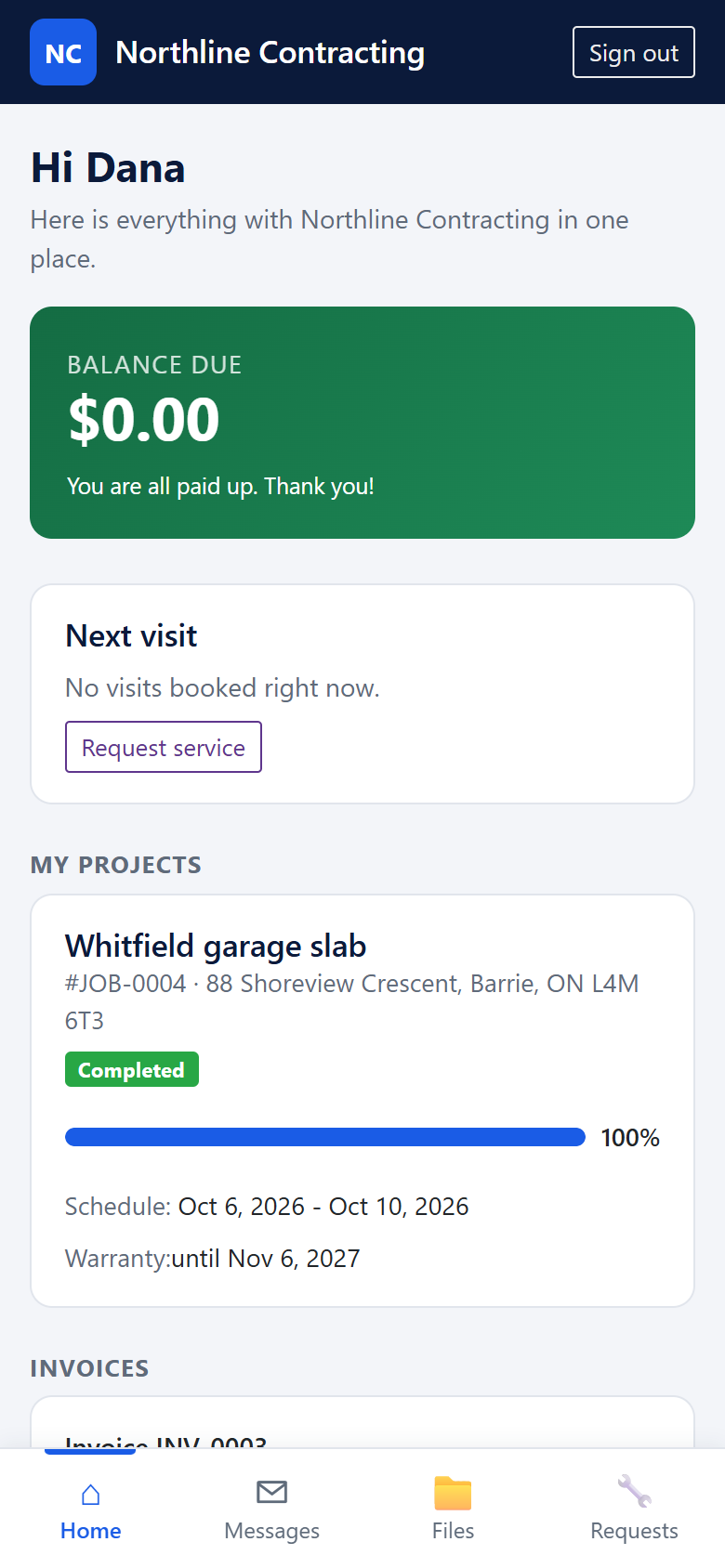
- Customer portal. Customers sign in to see their estimates, invoices, upcoming visits, shared files and messages, and to raise a service request.
- Branded documents. Estimates, invoices, change orders, purchase orders and completion reports as PDFs with your logo and details.
Not built yet
So you can plan around it. If one of these matters to your business, tell us on the contact page; it helps decide what gets built next.
| Capability | Status today |
|---|---|
| Online card payments | Invoices have a customer link and an "allow online payment" switch, but card processing is not connected. Payments are recorded by the office. |
| Offline use | The field app needs a connection to load and save work. There is no offline queue. |
| Native mobile apps and a desktop installer | The field app is a web app added to the home screen. A Windows desktop application exists in development but is not yet available to download. |
| SMS to customers or crew | Customer notices go by email. Text messaging is not connected. |
| Holdbacks and refunds | Construction holdbacks (retainage) and refund records are not modelled yet. |
| Customer import from spreadsheets | Customers are entered in the app or arrive through leads and the portal. Supplier price lists do import from CSV. |
| Two-factor sign-in and self-serve password reset | Passwords are reset by your company admin or by us. |
Try it with your own jobs
Create a company, load your price book and send a real estimate. The trial is 30 days and needs no card.