Quote the job, schedule the crew, send the invoice. One system.

TradePilot Pro is business software for trade contractors in Canada. The estimate you send becomes the project, the work orders and the invoices, so nothing is typed twice and the office and the crew look at the same job.

30-day free trial. No credit card. Pricing is not published yet and nothing is charged without your agreement.

  • Runs in any current browser
  • Field app on the crew's phones
  • GST/HST, PST and QST by province

Three things it has to do well

Most contractors quote in one tool, keep the schedule in another, and track costs in a spreadsheet that never agrees with the invoices. TradePilot Pro keeps all three on the same job record.

Estimate and win the work

Build the quote from your price book, group it into sections, set markup and a deposit, and send the customer a link. They approve and sign it online; you see when it was viewed and approved.

  • Leads with follow-up dates and a pipeline by stage
  • Templates, revisions and optional lines the customer can tick
  • Approval with a drawn signature, name and time recorded
Estimating features

Schedule crews and run the job

An approved estimate becomes a project with work orders. Drag them onto the dispatch board by day and crew. Each tech opens the field app on their phone and gets the address, the checklist and the clock.

  • Week board with crew availability and an unscheduled list
  • Checklists, photos, notes and a customer sign-off per work order
  • Time clock by job, with timesheet approval
Scheduling and field features

Invoice, collect and see what you made

Raise deposit, progress and final invoices from the same job. Record payments as they land, let reminders go out on overdue balances, and compare what you quoted with what the job actually cost.

  • Tax rates preloaded for your province
  • Payments, balances and receivables ageing
  • Estimate versus actual cost and margin per project
Invoicing and job cost features
One job, start to finish

A basement finish, from quote to deposit

The screens below follow one record through a demo company, Northline Contracting. Same customer, same numbers, no re-typing between steps.

Customer
Sarah Hughes, Barrie ON
Job
Basement finishing, 900 sq ft, 3-pc bath
Estimate
EST-0005, $52,182.27 incl. HST
Deposit
20%, $10,436.45
  1. Estimate

    Build the quote in sections

    Framing, insulation and drywall, mechanical, finishes and permits, each with labour, material and subcontract lines from the price book. Markup and a 20% deposit are set once. Ontario HST comes from the company's tax settings, which are preloaded for your province.

    Shown: estimate EST-0005, revision 1, with the status panel recording when it was sent, viewed, approved and converted.

  2. Approval

    The customer approves from a link

    Sarah opens the estimate link on her phone or computer, ticks any optional lines, types her name and signs with her finger. The estimate locks, the approval is stamped with her name and the time, and the deposit invoice can be created from it.

    Shown: the customer's view after approval. Changes after this point go through a new revision or a change order, which she signs the same way.

  3. Scheduled work

    Work orders go on the board

    Converting the estimate creates project JOB-0001 with one work order per section, the estimate lines becoming the checklist. Each work order carries the address, photos, time entries and the assigned crew. Drag it onto a day on the dispatch board and the tech sees it in the field app.

    Shown: WO-0017, insulation and vapour barrier, scheduled for Tuesday with Mike Dufresne.

  4. Invoice

    Deposit invoiced and paid

    The deposit invoice was created from the estimate with the same tax and the project attached. When the e-transfer arrives it is recorded against the invoice, the balance goes to zero and the payment shows in the project's financials. Progress and final invoices follow the same pattern.

    Shown: INV-0001, a deposit invoice for $10,436.45, recorded as paid by e-transfer.

Scheduling and the field

The office sees the week. The crew sees today.

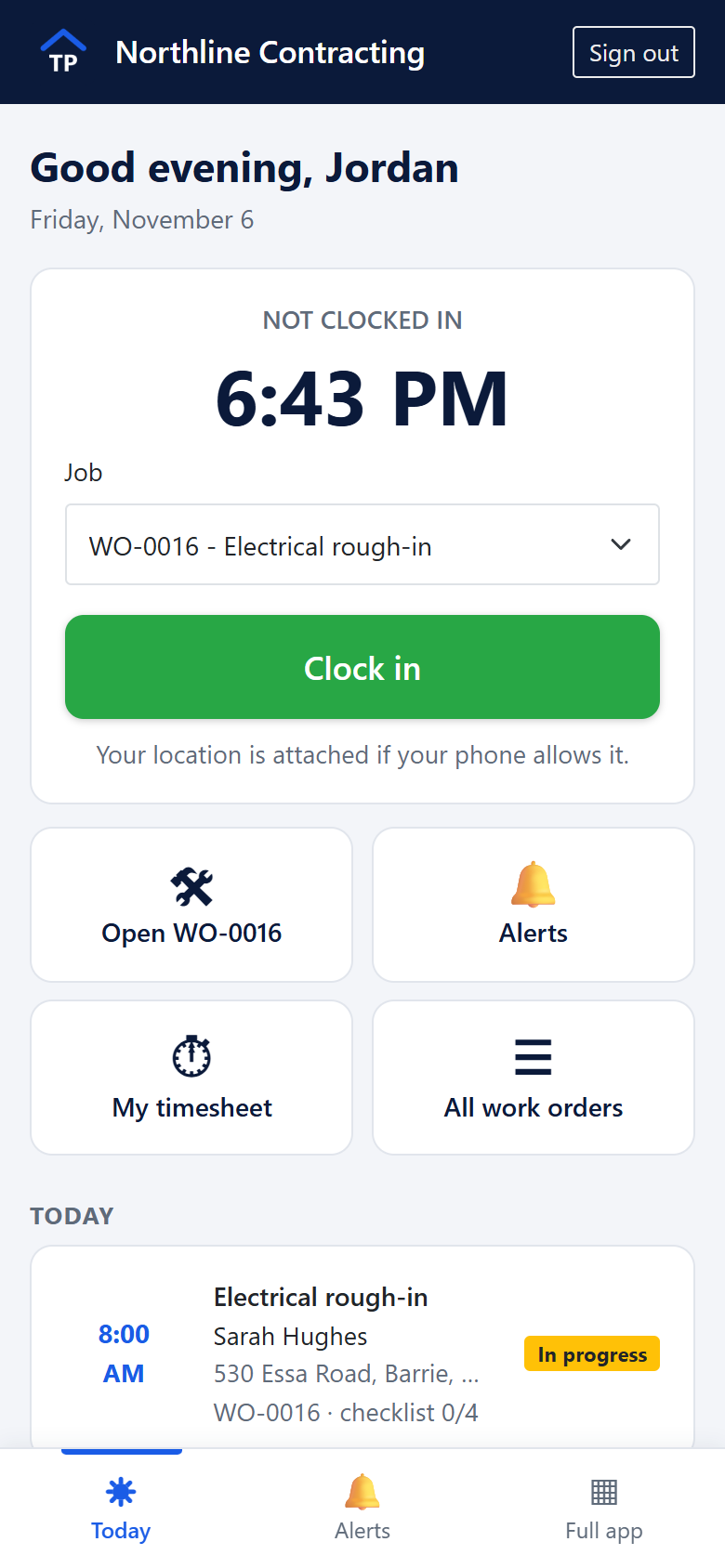
The dispatch board shows every work order by day with who is free. The field app runs in the phone's browser and can be added to the home screen; it shows each tech their jobs, the checklist, photo capture and the time clock.

The field app on a phone: a technician's day with the time clock, a job selector, a clock-in button and today's work order.

Where it runs

One account, one set of data, reached three ways. There is no native app store download and no offline mode; the field app needs a connection to save work.

Web app, in the browser

The full system at app.tradepilotpro.live. Nothing to install. Works on Windows, Mac, Chromebook and tablets in a current browser.

Field app, on phones

A phone-sized view of today's work orders, checklists, photos and the time clock. It is a web app you add to the home screen from the browser, so there is nothing to install from a store.

Customer portal

Your customers approve estimates from a link and can sign in to a portal to see their estimates, invoices, visits, files and requests. Portal access is included with your account.

What you should know before you put your business in it

Who runs it

TradePilot Pro is developed and supported in Canada by the people who write it. Support is by email at hello@tradepilotpro.live; there is no call centre.

Your data is yours

Lists and reports export to CSV from inside the app, and invoices, payments, customers and supplier bills export in QuickBooks and Xero formats. The terms say in plain words that you own what you enter.

Roles and permissions

Owner, admin, office, technician, subcontractor and customer roles, with permissions you can adjust. By default a technician sees their own work orders and time; costs, margins and settings stay with the office.

Early access, labelled as such

The product is in use and under active development. Everything on this site is something you can use today; what is still being built is marked on the features page.

Set up your company and send a quote today

Creating a company takes a few minutes. Add a customer, build an estimate and send it. If you would rather see it first, ask for a demo and we will walk through it with jobs like yours.